> ## Documentation Index
> Fetch the complete documentation index at: https://trigger-maxcomputeseconds.mintlify.site/llms.txt
> Use this file to discover all available pages before exploring further.
# Priority
> Specify a priority when triggering a run.
You can set a priority when you trigger a run. This allows you to prioritize some of your runs over others, so they are started sooner. This is very useful when:
* You have critical work that needs to start more quickly (and you have long queues).
* You want runs for your premium users to take priority over free users.
The value for priority is a time offset in seconds that determines the order of dequeuing.
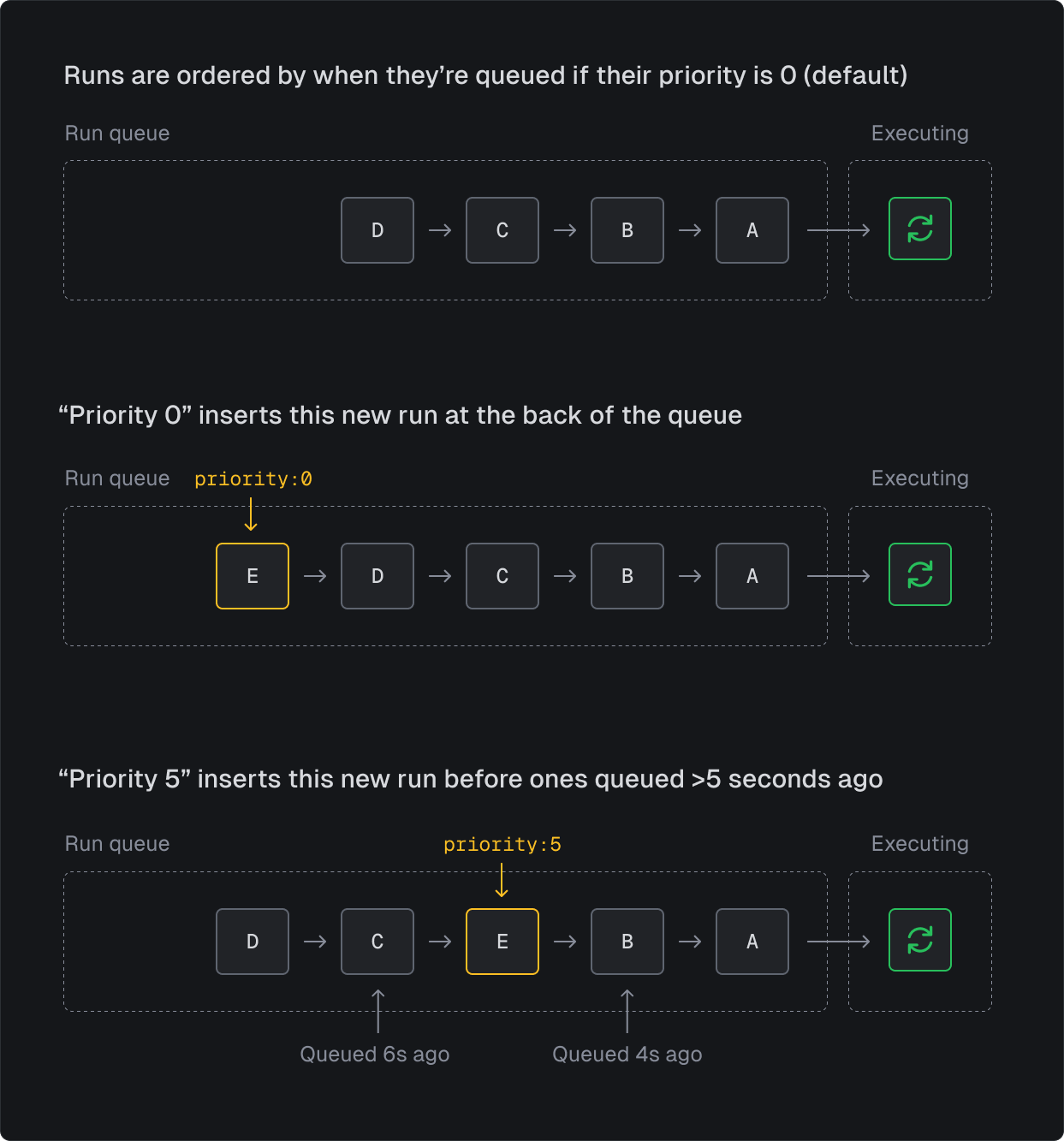 If you specify a priority of `10` the run will dequeue before runs that were triggered with no priority 8 seconds ago, like in this example:
```ts theme={null}
// no priority = 0
await myTask.trigger({ foo: "bar" });
//... imagine 8s pass by
// this run will start before the run above that was triggered 8s ago (with no priority)
await myTask.trigger({ foo: "bar" }, { priority: 10 });
```
If you passed a value of `3600` the run would dequeue before runs that were triggered an hour ago (with no priority).
Setting a high priority will not allow you to beat runs from other organizations. It will only affect the order of your own runs.
If you specify a priority of `10` the run will dequeue before runs that were triggered with no priority 8 seconds ago, like in this example:
```ts theme={null}
// no priority = 0
await myTask.trigger({ foo: "bar" });
//... imagine 8s pass by
// this run will start before the run above that was triggered 8s ago (with no priority)
await myTask.trigger({ foo: "bar" }, { priority: 10 });
```
If you passed a value of `3600` the run would dequeue before runs that were triggered an hour ago (with no priority).
Setting a high priority will not allow you to beat runs from other organizations. It will only affect the order of your own runs.