

prismaExtension supports multiple Prisma versions and deployment strategies through three distinct modes that handle the evolving Prisma ecosystem, from legacy setups to Prisma 7.
The
prismaExtension requires an explicit mode parameter. All configurations must specify a
mode.Migration from previous versions
Before (pre 4.1.1)
After (4.1.1+)
Choosing the right mode
Use this decision tree to determine which mode is right for your project:Extension modes
Legacy mode
Use when: You’re using Prisma 6.x or earlier with theprisma-client-js provider.
Features:
- Automatic
prisma generateduring deployment - Supports single-file schemas (
prisma/schema.prisma) - Supports multi-file schemas (Prisma 6.7+, directory-based schemas)
- Supports Prisma config files (
prisma.config.ts) via@prisma/configpackage - Migration support with
migrate: true - TypedSQL support with
typedSql: true - Custom generator selection
- Handles Prisma client versioning automatically (with filesystem fallback detection)
- Automatic extraction of schema and migrations paths from config files
- Prisma 6.14.0
- Prisma 6.7.0+ (multi-file schema support)
- Prisma 5.x
Engine-only mode
Use when: You have a custom Prisma client output path and want to manageprisma generate yourself.
Features:
- Only installs Prisma engine binaries (no client generation)
- Automatic version detection from
@prisma/client - Manual override of version and binary target
- Minimal overhead - just ensures engines are available
- You control when and how
prisma generateruns
- You must run
prisma generateyourself (typically in a prebuild script) - Your schema must include the correct
binaryTargetsfor deployment to the trigger.dev cloud. The binary target isdebian-openssl-3.0.x. - The extension sets
PRISMA_QUERY_ENGINE_LIBRARYandPRISMA_QUERY_ENGINE_SCHEMA_ENGINEenvironment variables to the correct paths for the binary targets.
- Prisma 6.19.0
- Prisma 6.16.0+
Modern mode
Use when: You’re using Prisma 6.16+ with the newprisma-client provider (with engineType = "client") or preparing for Prisma 7.
Features:
- Designed for the new Prisma architecture
- Zero configuration required
- Automatically marks
@prisma/clientas external - Works with Prisma 7 beta releases & Prisma 7 when released
- You manage client generation (like engine-only mode)
- You must run
prisma generateyourself. - Requires Prisma 6.16.0+ or Prisma 7 beta
- The new
prisma-clientprovider generates plain TypeScript (no Rust binaries) - Requires database adapters (e.g.,
@prisma/adapter-pgfor PostgreSQL)
- Prisma 6.16.0 with
engineType = "client" - Prisma 6.20.0-integration-next.8 (Prisma 7 beta)
Migration guide
From old prismaExtension to legacy mode
If you were using the previousprismaExtension, migrate to legacy mode:
Preparing for Prisma 7
If you want to adopt the new Prisma architecture, use modern mode:- Update your schema to use
prisma-clientprovider - Add database adapters to your dependencies
- Configure the extension:
Manage your own prisma generate step
When usingmodern and engine-only modes, you’ll need to ensure that you run prisma generate yourself before deploying your project.
Github Actions
If you are deploying your project using GitHub Actions, you can add a step to your workflow to runprisma generate before deploying your project, for example:
Trigger.dev Github integration
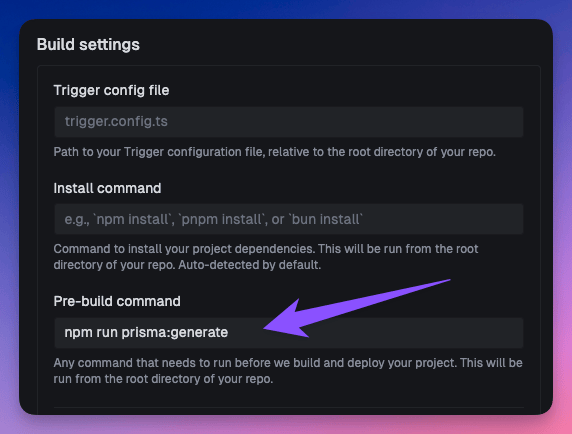
If you are using the Trigger.dev Github integration, you can configure a pre-build command to runprisma generate before deploying your project. Navigate to your project’s settings page and configure the pre-build command to run prisma generate, for example:
Version compatibility matrix
Prisma config file support
Legacy mode supports loading configuration from aprisma.config.ts file using the official @prisma/config package.
Use when: You want to use Prisma’s new config file format (Prisma 6+) to centralize your Prisma configuration.
Benefits:
- Single source of truth for Prisma configuration
- Automatic extraction of schema location and migrations path
- Type-safe configuration with TypeScript
- Works seamlessly with Prisma 7’s config-first approach
schema- The schema file or directory pathmigrations.path- The migrations directory path (if specified)
schema or configFile must be specified, but not both.
When to use which:
Multi-file schema support
Prisma 6.7 introduced support for splitting your schema across multiple files in a directory structure. Example structure:TypedSQL support
TypedSQL is available in legacy mode for Prisma 5.19.0+ with thetypedSql preview feature.
Schema configuration:
Database migration support
Migrations are supported in legacy mode only. Extension configuration:- Copies
prisma/migrations/to the build output - Runs
prisma migrate deploybefore generating the client - Uses the
directUrlEnvVarNamefor unpooled connections (required for migrations)
configFile, the migrations path is automatically extracted from your prisma.config.ts:
Binary targets and deployment
Trigger.dev Cloud
The default binary target isdebian-openssl-3.0.x for Trigger.dev Cloud deployments.
Legacy mode: Handled automatically
Engine-only mode: Specify in schema like so:
Self-hosted / local deployment
For local deployments (e.g., Docker on macOS), you may need a different binary target like so:Environment variables
Required variables
All modes:DATABASE_URL: Your database connection string
DATABASE_URL_UNPOOLED(or your customdirectUrlEnvVarName): Direct database connection for migrations
Auto-set variables
Engine-only mode sets:PRISMA_QUERY_ENGINE_LIBRARY: Path to the query enginePRISMA_QUERY_ENGINE_SCHEMA_ENGINE: Path to the schema engine
Troubleshooting
”Could not find Prisma schema”
Legacy mode: Ensure theschema path is correct relative to your working directory.
”Could not determine @prisma/client version”
The extension includes improved version detection that tries multiple strategies:- Check if
@prisma/clientis imported in your code (externals) - Use the
versionoption if specified - Detect from filesystem by looking for
@prisma/clientorprismainnode_modules
“Binary target not found”
Engine-only mode: Make sure your schema includes the deployment binary target:“Module not found: @prisma/client/sql”
Legacy mode: Make suretypedSql: true is set and you have Prisma 5.19.0+:
“Config file not found” or config loading errors
Legacy mode with configFile: Ensure the config file path is correct:- The config file must exist at the specified path
- Your project must have the
prismapackage installed (Prisma 6+) - The config file must have a default export
- The config must specify a
schemapath
--log-level debug in your trigger deploy command to see detailed logs:
[PrismaExtension] in your build logs to see detailed information about config loading, schema resolution, and migrations setup.
Complete examples
Example 1: Standard Prisma 6 setup (legacy mode)
prisma/schema.prisma:Example 2: Multi-file schema (legacy mode)
prisma/schema.prisma:Example 3: Using Prisma config file (legacy mode)
Use aprisma.config.ts file to centralize your Prisma configuration.
prisma.config.ts:
Example 4: Custom output path (engine-only mode)
prisma/schema.prisma:Example 5: Prisma 7 beta (modern mode)
prisma/schema.prisma:Resources
- Prisma Documentation
- Multi-File Schema (Prisma 6.7+)
- TypedSQL (Prisma 5.19+)
- Prisma 7 Beta Documentation